
Ultimate Zeekr 001 Owner’s Guide: Tips & Hidden Features
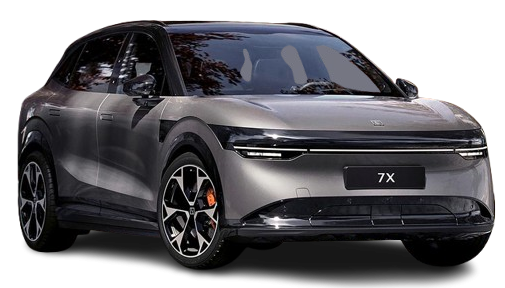
From its dual-motor performance to the massive 15.4-inch display, the Zeekr 001 is loaded with technology. Yet many features stay hidden in submenus, and a handful of maintenance quirks can trip up both new owners and used-car buyers. This expert, hands-on guide walks you through hidden shortcuts, common problems, wiper replacement (with exact blade sizes), smart upgrades, and cold-weather driving—so you get the most out of your electric luxury liftback.
Hidden Zeekr 001 Features You Probably Haven’t Found
Spend 10 minutes in the menus and you’ll discover these gems:
- Location-aware charging schedule: Set a home anchor in the charger settings. The car will delay charging until your chosen off-peak tariff begins, saving money without you having to touch the app every night.
- Free-move 360° camera: When reversing, tap the 3D car model in the camera view and drag it around to inspect any corner. Great for parking close to a high curb or garage wall.
- Digital key sharing: Create up to five phone keys and give each driver different usage limits—like speed alerts or valet restrictions—directly from the Zeekr app and in-car privacy menu.
- Wiper service mode: Activate it from the controls panel and the blades park vertically, leaving space to lift them from the glass. Useful for swapping blades or freeing stuck windshield ice.
- Media sync memory: Favourite an EQ preset in settings and activate “Seat Vibrations” (if you have the Pulse pack) to feel bass through certain tracks.
Common Zeekr 001 Problems and How to Handle Them
- 12V battery drain warnings: The most common owner complaint. Usually triggered after sitting with the door open for a while or running the sound system with the ignition off. Fix: switch to Ready mode while parked, and charge on a longer drive. If it returns often, the AGM 12V battery may need replacing.
- Infotainment black screen: It’s rare, but if the central display freezes, hold the volume dial down for 10 seconds to reboot the system without fully restarting the car. No tools required.
- Wind noise at highway speeds: Frameless doors look great but can whistle above 120 km/h. Check door seals for grit. Wipe them clean, then apply a thin layer of silicone lubricant to the rubber.
- Inaccurate wiper washer spray: If the spray nozzles clog or point wrong, use a pin to adjust the angle of the small jets. This is easier after you activate wiper service mode.
Zeekr 001 Wiper Blade Sizes & Replacement Guide
Knowing exact wiper sizes saves a tonne of guesswork. The Zeekr 001 uses 26-inch (650mm) on the driver side and 19-inch (475mm) on the passenger side. There is no rear wiper fitted. Because of the car’s aero-shaped arms, use a flat beam blade with a direct-fit connector—not an adapter, as it might flex in minor collisions. For winter, install the same size but with a softer rubber for cleaner ice removal.
Here is a step-by-step replacement process you can trust:
- Turn on the car and set the wiper service mode (Settings > Vehicle > Wiper Service Mode). The arms will swing up and stop vertically.
- Gently pull the wiper arm away from the glass until it locks in the upright position.
- Engage the small locking tab on the connector and slide the current blade down along the arm until it releases.
- Guide the new blade into the J-hook—it should seat with an audible click. Double-check it’s secure, then slowly lower the arm back to the glass.
Replace your wiper blades every 6–12 months—more frequently if you live in dusty areas or extreme sun. This not only gives clearer vision but also reduces vibration and streaking. Need them fast? Most Zeekr 001 owner groups confirm the OE blade is a Bosch Aerotwin design, so any premium OEM-quality flat beam will work.
Smart, Warranty-Safe Upgrades Every Owner Should Consider
- HEPA + charcoal cabin filter: Swapping the factory cabin filter to a dual-layer premium one brings cleaner air and reduces fogging. This is a simple DIY job, typically under a glove box.
- Ceramic glass treatment: Apply a professional-grade nanocoating to the windshield and side glass. It makes water bead up and fly off at speed—so your wipers work less, and you’ll ‘clean’ the glass with wiper control and a quick spray.
- Cargo organizer: Use a low-profile boot divider to keep cables and the inflator kit from sliding around, preventing those annoying rattles in the cargo area.
- Digital tyre pressure monitoring: Let the built-in system do its thing, but if you swap to aftermarket wheels, add Bluetooth valve caps or an internal TPMS with a solar display to monitor each corner on longer road trips.
Winter Driving in Your Zeekr 001: Insider Tips
- Pre-heat while plugged: Five minutes of app preconditioning before you leave clears ice and warms the cabin without sacrificing your intended range. Use the timer to start defrosting just before you head out.
- Switch to Snow Mode: The off-road settings include a dedicated snow/ice mode that softens throttle response and optimizes torque for quiet, predictable acceleration.
- Never pour hot water on frozen wipers: Use the car’s windscreen heater, or give the climate system 5 minutes to warm the glass on a gentle cycle. After warming, run your wipers on low to avoid smearing.
- Keep charging port dry: If the charging flap freezes shut, give it a short burst from your climate control’s battery pre-heater or park in a sunny spot for 10 minutes. Do not pull it open by force.
- Use winter-formatted windshield fluid: Standard fluid turns to slush at -10°C. A premium winter washer fluid prevents the nozzles from clogging and helps the wipers clear frost faster.
Zeekr 001 Owner FAQ
What exact wiper sizes does the Zeekr 001 need?
Driver side: 26 inches (650mm). Passenger side: 19 inches (475mm). Always use flat-beam blades that match OE connector. No rear wiper is fitted.
How often should I change the cabin air filter in a Zeekr 001?
Every 15,000 km or 12 months—whichever comes first. If you live in an area with heavy pollen or construction dust, shorten the interval to 10,000 km.
Can I reset the infotainment myself if it’s slow?
Yes. Holding the volume knob for 10 seconds triggers an infotainment reset—your drive mode settings won’t change. If that doesn’t fix persistent lag, schedule a service appointment.
Is there a way to stop the 12V battery warning from occurring?
With regular driving (20 minutes or more) the main battery tops up the 12V system. If you often go on short trips, put the car in Ready mode once a week for 30 minutes while parked to let the DC-DC converter work. If the warning still keeps coming after a full top-up, have the 12V battery load-tested—a low-capacity battery is the usual root cause.
Owning a Zeekr 001 is a smooth, connected experience once you know where to look. Use these hidden features, stay out ahead of the occasional gremlin, and keep your wipers in prime condition—you’ll enjoy the many electric miles in confidence.

